SamplesDemo project
Spreadsheet to system
Excel workbook → web app with reminders.
For: A cleaning company.
Live demo coming soon. The demo is built and working; the screenshots on this page are from it, with made-up data.
Before
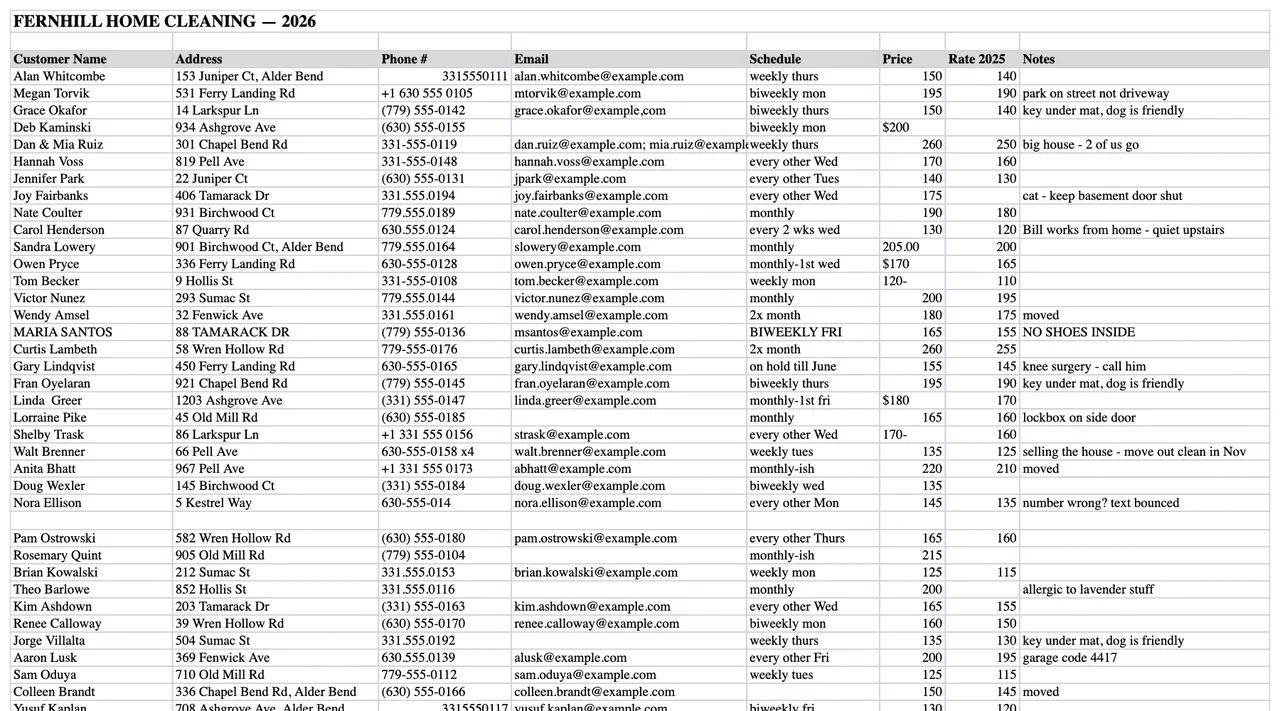
One workbook, typed by hand between cleans.
After
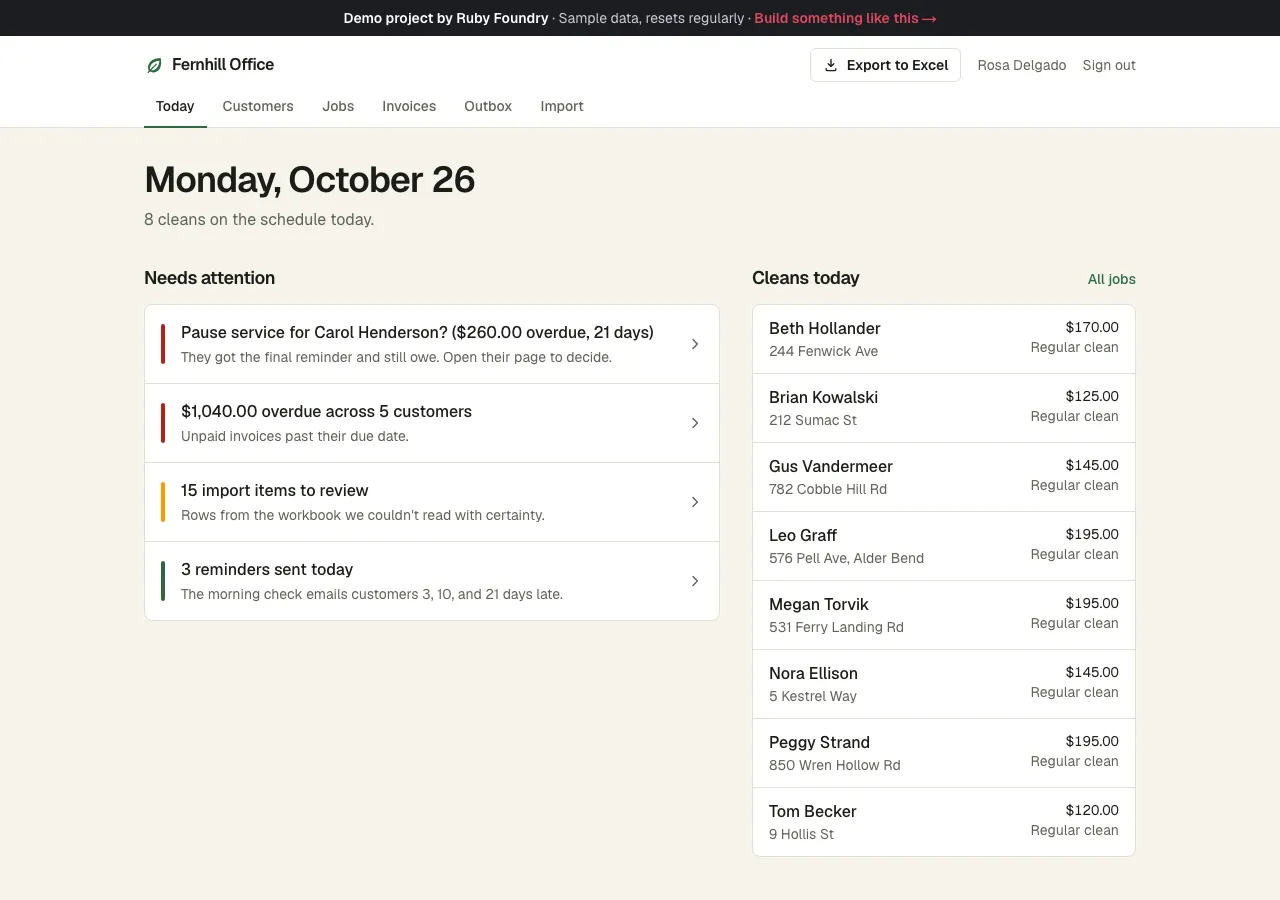
One screen for the morning: today's cleans and who owes what.
The problem
Fernhill Home Cleaning looks after about sixty households in a small town: weekly, biweekly, and monthly cleans, plus the odd deep clean or move-out. For nine months the whole business has lived in one workbook, Fernhill jobs & invoices 2026 FINAL (2).xlsx, typed by hand between cleans.
It works, until it doesn’t:
- The same customer appears as “Jennifer Park”, “Jen Park”, and “PARK, JENNIFER”.
- Phone numbers come in five formats, and one is missing a digit.
- Payments are notes in a “Paid?” column:
Y,pd cash 10/25,partial - $60 venmo,paid 80 chk #2231,check bounced!!,comp'd. Yellow means “partly paid”. - Nobody can say who owes what without an afternoon of scrolling, so late invoices go unchased.
How we approached it
We didn’t ask the owner to clean up the spreadsheet first. We read it as it is and sorted every problem into one of three piles:
- Fix it and count it when there’s only one sensible reading:
4-Mar-26andMarch 4thare the same date,$1,200and1,200are the same amount. - Make a best guess and flag it when a person should decide: “Jen Park” has a different phone from “Jennifer Park”, so we keep them apart and ask.
- Skip it and say so when it isn’t data: subtotal rows, blank spacer rows, and a tab literally named “OLD - dont use”.
Then we built the small app the business actually needs around the cleaned-up data, and kept an Export to Excel button so the owner never feels locked in.
What it does
The import report
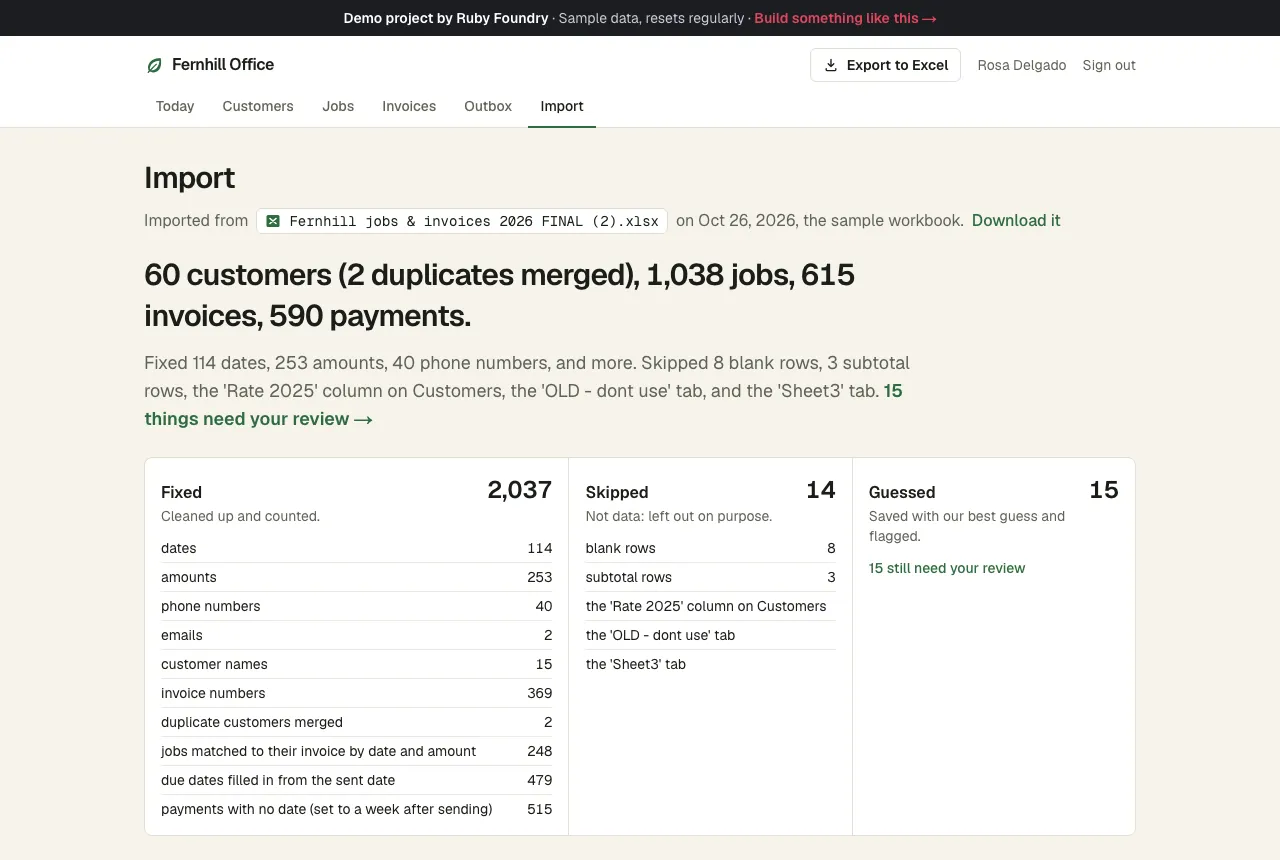
The first screen after import says exactly what happened to the workbook: 60 customers (2 duplicates merged), 1,038 jobs, 615 invoices, 590 payments. It fixed 114 dates, 253 amounts, and 40 phone numbers, skipped the 'OLD - dont use' tab, and flagged 15 things for review.
Needs your review
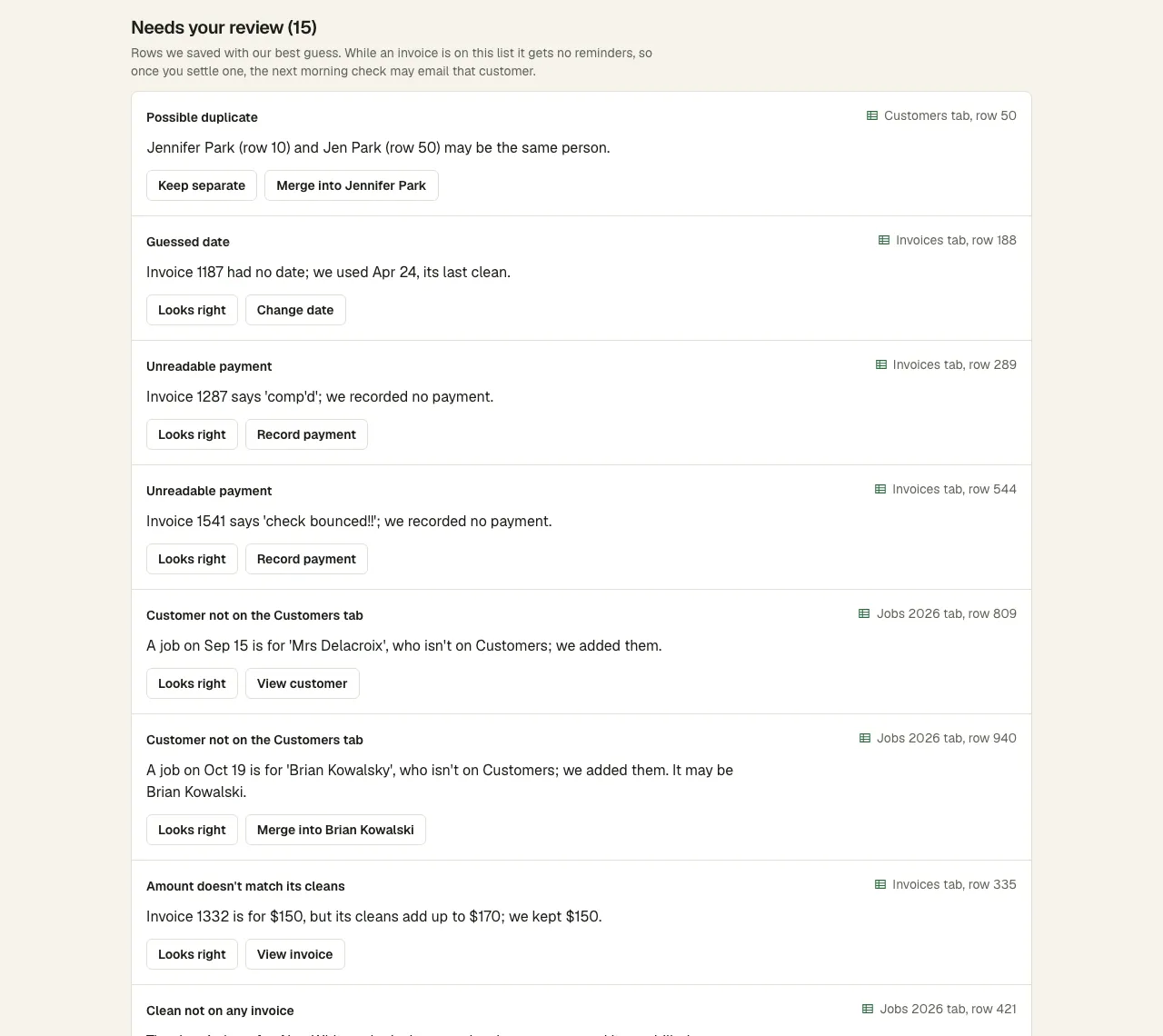
Fifteen rows out of more than 1,700 needed a person. Each says where it came from and offers two buttons, such as "Jennifer Park (row 10) and Jen Park (row 50) may be the same person. [Keep separate] [Merge into Jennifer Park]".
Invoices with partial payments
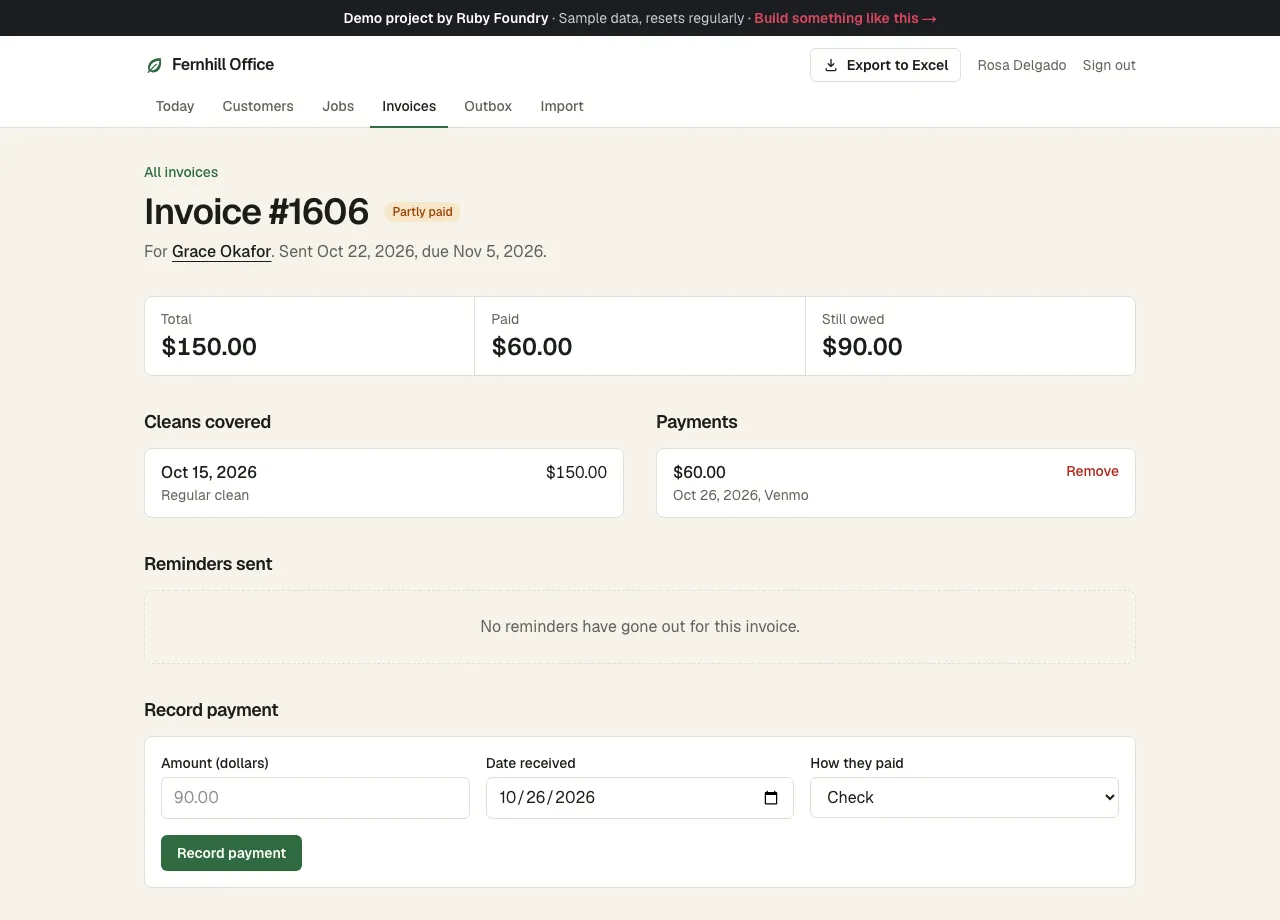
"partial - $60 venmo" becomes a real $60 Venmo payment, and the invoice shows $150 total, $60 paid, $90 still owed. Recording the rest takes three fields and a click.
Reminders that send themselves
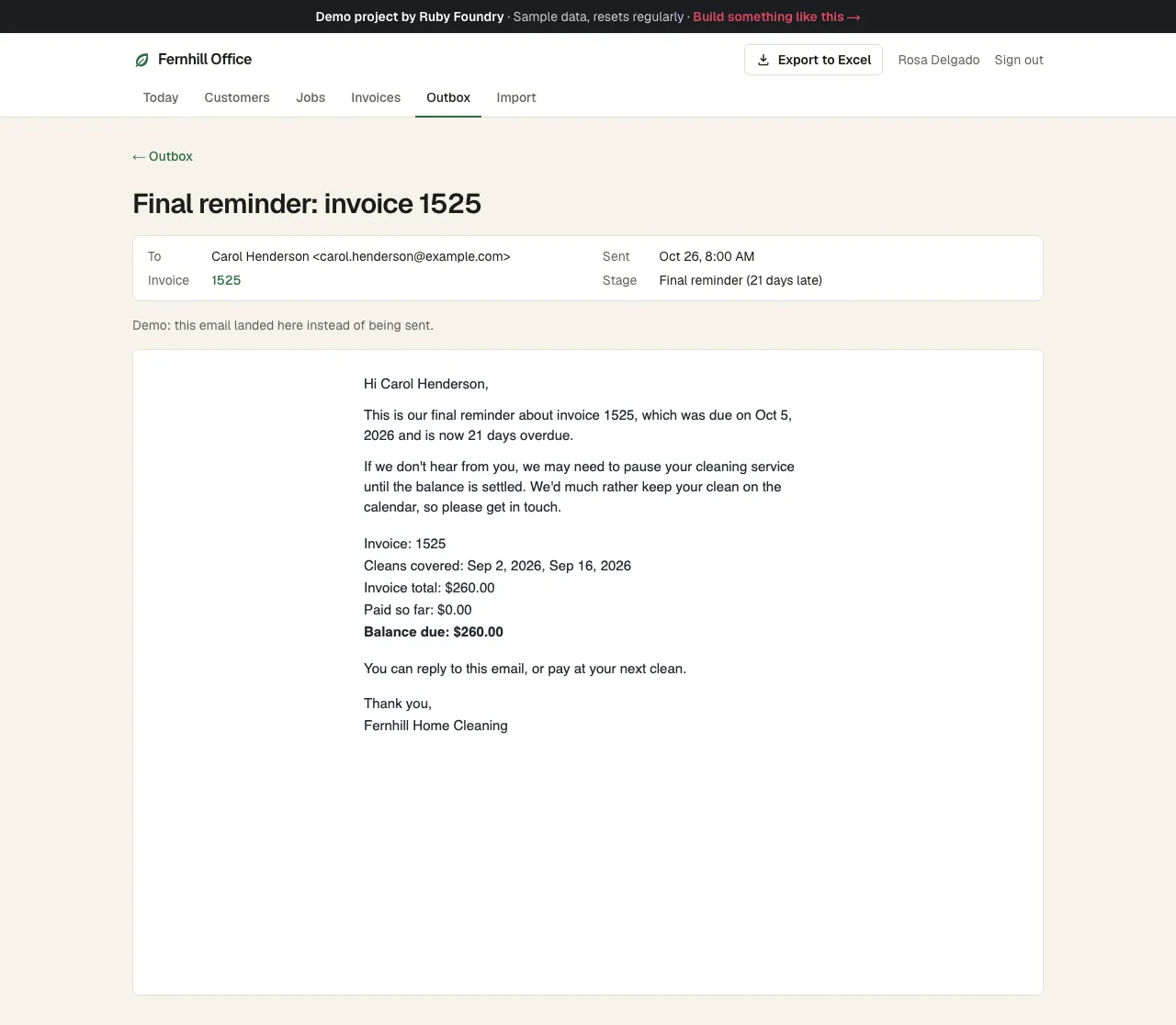
Every morning at 8:00 the app finds invoices 3, 10, and 21 days late and emails a friendly, a firmer, and a final reminder, once each. In the demo they land in an Outbox instead of being sent, so you can read exactly what the customer would get.
Export to Excel
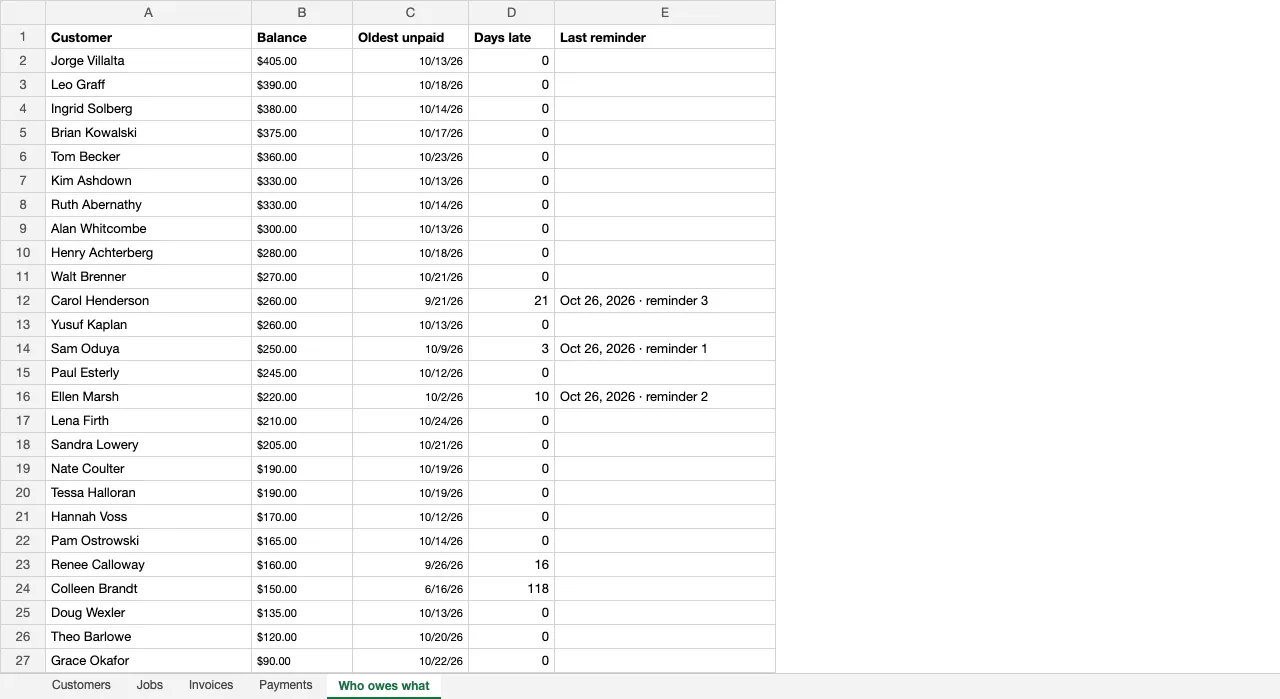
One click downloads a tidy workbook with Customers, Jobs, Invoices, Payments, and a Who owes what tab: each customer's balance, when their oldest unpaid invoice was sent, days late, and the last reminder sent.
Technology used
| Next.js and TypeScript | The app itself: pages, forms, and the server code behind them, in one widely known framework. |
|---|---|
| PostgreSQL | The database where customers, jobs, invoices, and payments now live, with exact balances. |
| ExcelJS | Reads the messy workbook during import and writes the tidy Export to Excel workbook. |
| Zod | Recognizes what each spreadsheet cell really holds and checks every form, so problems become plain sentences instead of errors. |
| TanStack Table | The searchable, sortable tables that replace the spreadsheet tabs. |
| React Email | Writes each reminder as the email a customer would see. Switching on real sending is a small, contained change. |
| A built-in morning timer | Runs the overdue check at 8:00 every day without any extra service. |
| Automated tests | Over two hundred quick checks on the import and reminder rules, plus a robot that clicks through the app in a real browser. |
Built to be handed over
Every project ends with two short guides, written for people rather than machines. The owner's guide explains, in plain words, how to run the software day to day. The engineer onboarding guide lets any developer you hire later find their way around the code, the hosting, and the data in an afternoon. You keep the code, so you are never stuck with us.
For this project, the owner's guide includes lines like this:
“To record a payment, open the invoice, type the amount, pick how they paid, and click Record payment.”
What a project like this looks like
Scope
- Your spreadsheet read as it is: each problem fixed, flagged for you to decide, or skipped
- The small app the business needs, built around the cleaned-up data
- An Export to Excel button, so you're never locked in
- An owner's guide and an engineer onboarding guide
From first call to finish
- A free 30-minute call
- A written, fixed quote
- A kickoff call within a week of signing
- 3 weeks of building, with a written update each week
- Launch and handover
- 30 days of fixes included
Typical total
about $11,000
Your own quote is written for your project and fixed before we start.